Tip: We also have a similar online search tool for searching Medicare Advantage plans in a specific Service Area (ZIP, Country, or partial-County) - our Medicare Advantage Plan Finder or MA-Finder, located directly at MA-Finder.com. Just begin by choosing your state, then county or enter your Zip Code (here is an example for St. Johns County, Florida: MA-Finder.com/32084). The this site Medicare Advantage Plan Finder includes all types of Medicare Advantage plans: MA, MAPD, MSA, and SNPs.
Need some help with the MA-Finder? See: Does this site offer a Medicare Advantage Plan Finder?
Question: How can I get started searching stand-alone Medicare Part D plans in my state?
You can start at the link: PDP-Finder.com - and choose your state (or territory) from the list of state abbreviations and then you can view a list of all Medicare Part D plans in the chosen area. Here is an example PDP-Finder link to see all stand-alone Medicare Part D plans in Florida, sorted by premiums (and you can change the sort order): PDP-Finder.com/Fl. You can find the same link to the PDP-Finder in the left-hand navigation and all of the state abbreviations are shown on the on this site homepage.
Question: What information will I see for each Medicare Part D plan?
When viewing the list of all Medicare Part D plans, you can get a quick overview of important Medicare Part D drug plan features offered by each Medicare Part D plan including:
- the name of the stand-alone Medicare Part D prescription drug plan (PDP)
Tip: You can click on the name for more coverage and plan details (see below for more information), - an overview of the Part D plan's Star Ratings with links to more details about the meaning of the plan's Star Ratings,
- the monthly plan premium, even if the plan has a $0 premium (the default PDP-Finder view is the plan's premium without considering any low-income subsidy),
- initial deductible (if applicable, some plans have a $0 deductible - and many plans will exclude low-costing tiers from the deductible and we will show: "Tier 1 and 2 exempt"),
- the number of formulary drug tiers and the co-payments or cost-sharing for each drug tier,
- whether the Medicare Part D plan qualifies for the state's full Low-Income Subsidy $0 premium,
- the Medicare Part D plan ID (such as: S5884-150),
- a link to the plan's online drug list ("Browse Formulary") so you can view the plan's formulary or drug list (and you can see the total number of drugs covered by the Medicare Part D plan),
- special Insulin coverage: all Medicare drug plans will cover insulin on the plan's formulary for a co-pay of $35 or less, and
- whether the plan has preferred pharmacy pricing (showing Rx$ icon) - meaning you may pay less at a preferred pharmacy.
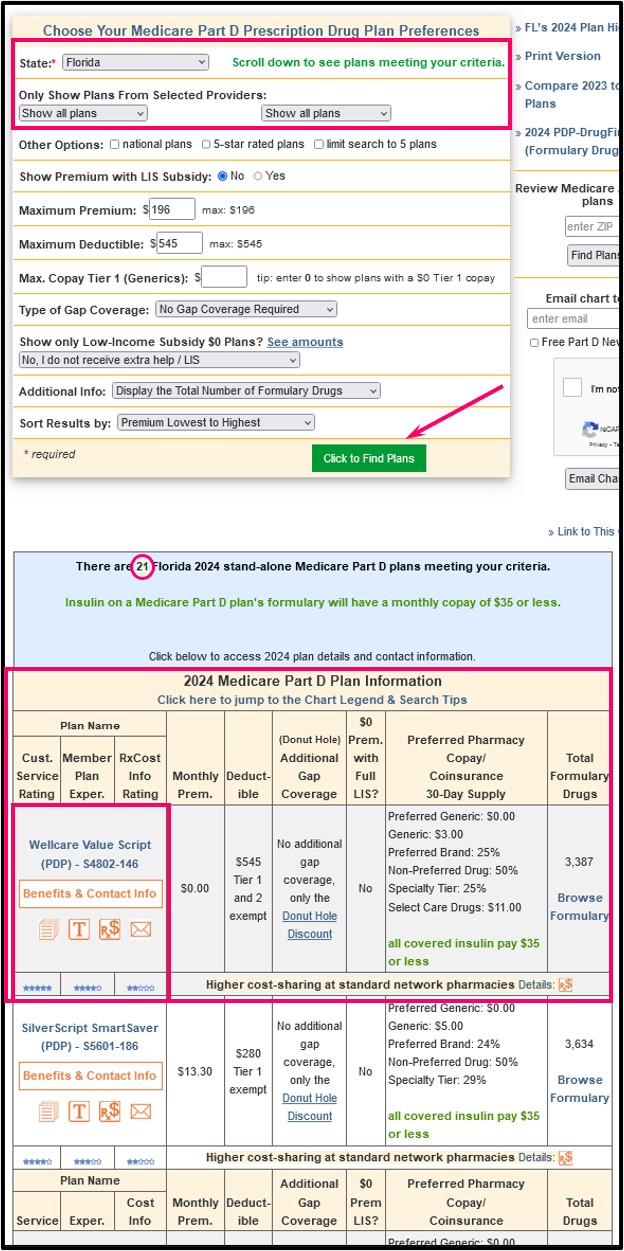
On this same page, the PDP-Finder also shows:
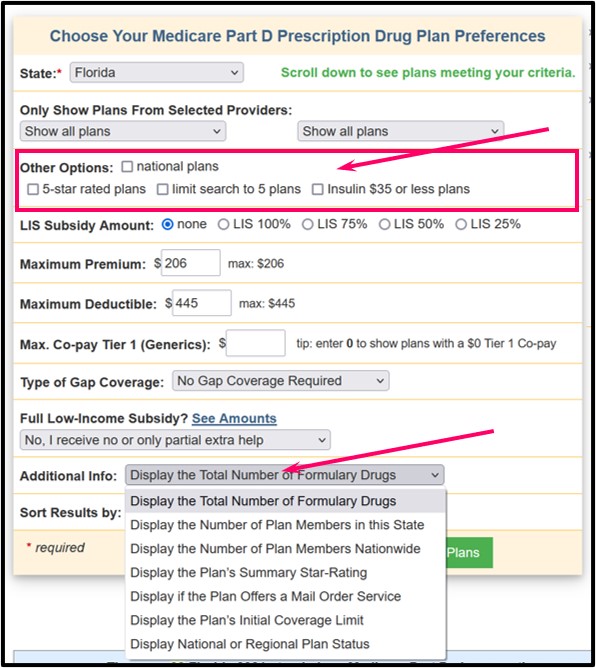
- other plan details (such as plan enrollment) to help in your decision making - plus you can learn more about your Part D drug coverage when you are eligible for Medicare Part D Extra Help or the Low-Income Subsidy (LIS).
For example, you can use the "Other Options" filter to see specific plan features - or you can use the "Additional Info" drop-down box in the search form to see other information about each Medicare Part D plan (such as state or regional enrollment) - this will be shown in the right column where the formulary size is shown by default.

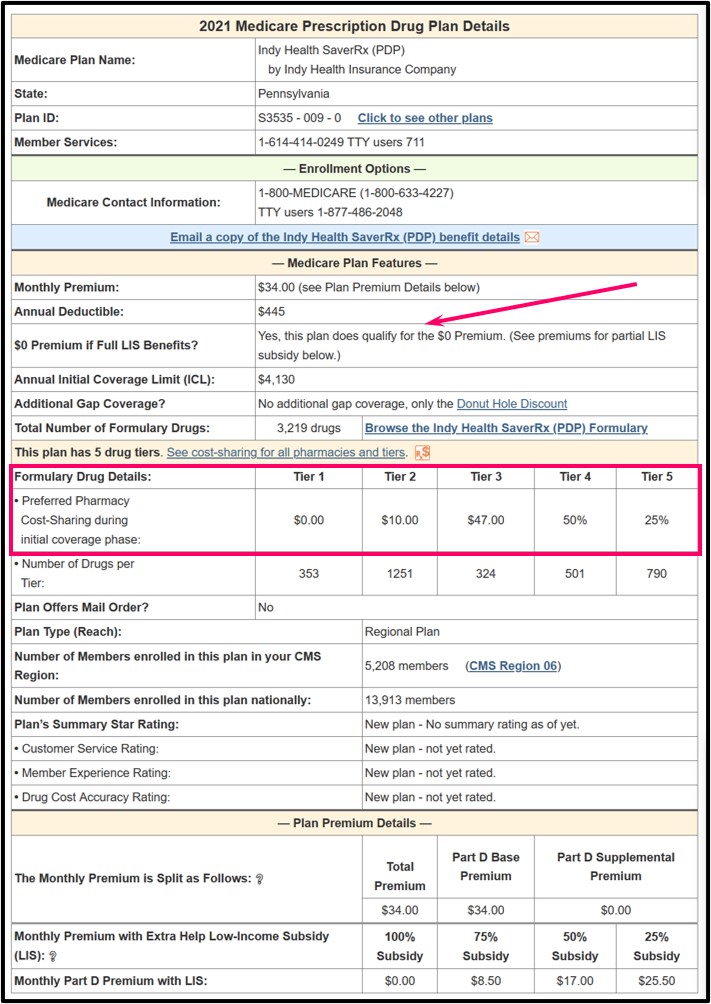
Both links will take you to a page showing more Part D plan details such as formulary information (number of drugs per tier), cost-sharing, basic enrollment information, Star ratings, and the toll-free Member Services number for every Medicare Part D plan.
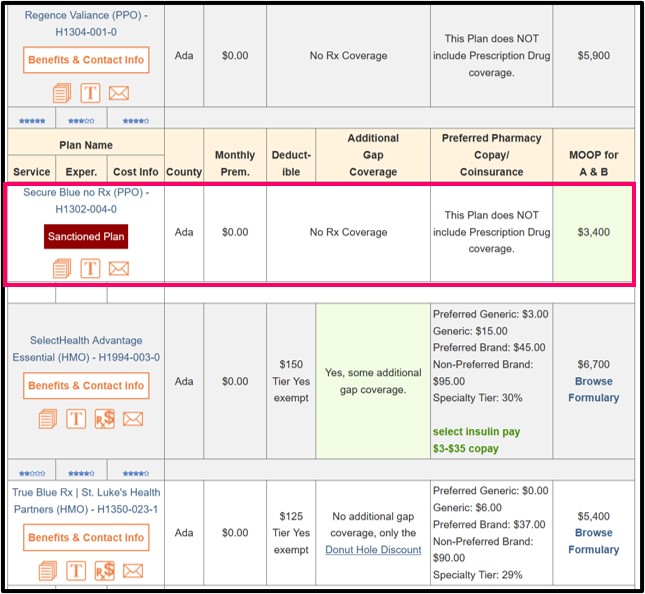
As noted, we show all Medicare Part D and Medicare Advantage plans in our Plan Finders - even "sanctioned" Medicare plans.
If the Medicare plan is sanctioned by the Centers for Medicare and Medicaid Services (CMS) and the plan is not currently accepting enrollment, we will show a darkened-red "sanctioned icon under the plan name with only "Benefit Details".
Important note about this example: This graphic below is showing an older example of a Medicare Advantage plan that is no longer sanctioned - also remember, governmental sanctions do not affect the coverage of current plan members. And member of a sanctioned Medicare plan can usually stay with their plan. However, the Medicare plan may not be allowed to add new plan members until the sanction is lifted.
Review: You can find our Medicare Part D Plan Finder by just entering PDP-Finder.com.
To get you started, the following link is an example of the PDP-Finder showing all stand-alone Medicare Part D plans in the state of New Jersey: PDP-Finder.com/NJ (If you want to see the Medicare Part D plans in another state, just click on the state abbreviation of your choice.)
Questions? If you have questions, please click here and let us know.