(1) Ask your drug plan for a transition fill.
During the first 90 days of your plan coverage, you can ask your Medicare prescription drug plan for a one-time, transition fill (a temporary 30-day supply of your medication). To initiate a transition fill request, call the Member Services telephone number found on your Member ID card or your plan’s printed information. You can click here to read more about transition fills.
(2) Look for an alternative formulary drug.
While using your 30-day transition fill, you and your physician should look for an alternative medication (such as a generic equivalent) that is included on your drug plan’s current formulary. As explained in more detail below, you can use our this site Formulary Browser to see all medications on your plan’s drug list.
(3) Request a formulary exception for coverage of your non-formulary drug.
If you cannot find an alternative medication on your formulary, you can ask your Medicare Part D plan for a formulary exception (a type of coverage determination) so that your non-formulary medication is covered by your 2024 Medicare plan. Click here to learn more about requesting a formulary exception and you can click here to learn about the prescribing physician’s role in the formulary exception request process.
Important: Your transition fill is only for a 30-day supply of an existing prescription, so start working with your prescriber right away to find an alternative medication or file a formulary exception request.
Reminder: Formulary exception requests are not always approved. If your formulary exception request is denied, you have the right to appeal your plan’s decision a number of times, ultimately with a review by an independent group. You can click here for an overview of the Medicare Part D appeals process.
Question: Is there a quick way for me to see the medications covered by my Medicare prescription drug plan?
Yes. We have an online Formulary Browser that lets you browse through any Medicare Part D (PDP) or Medicare Advantage (MAPD) plan drug list.
-
To begin, you can click here or go to FormularyBrowser.com.
- Select either PDP (drug only plans) or MAPD (health and drug plans),
then choose your state, the name of your Medicare plan provider (such
as AARP or Humana), and click “Search”.
- Next, choose the specific name of your Medicare plan as offered by your provider (such as the AARP MedicareRx Preferred plan), and click “Search” again.
Please notice that in the search box, you see the formulary drug tiers and the number of drugs on each tier, and you can hide tiers from the results, for example, if you only want to see Tier 1 drugs.
The results will show you the medication name, the drug tier, the cost-sharing at a preferred network pharmacy, and any drug utilization management restrictions.
You can click on the 30- or 90-day cost-sharing figures (such as $10.00 for Tier 1 drugs in Florida) to see additional pricing details and the average retail cost history.
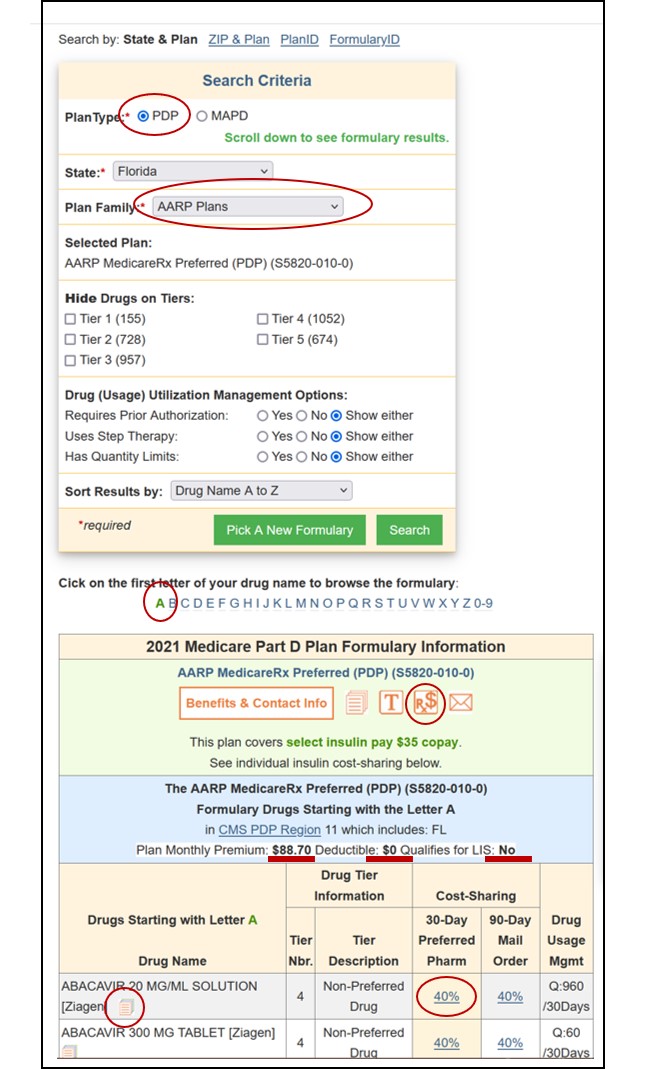
As an example, you can click here to browse the Florida AARP MedicareRx Preferred formulary (just change the state and plan information to whatever you want).
Reminder: Both our Formulary Browser (showing all drugs for a single Medicare plan) and our Drug Finder (showing all Medicare plans covering a single drug) display the drug cost-sharing information, along with the details of the drug utilization management restrictions (for example, Q: 30/30Days for a quantity limit) for all Medicare Part D plans and Medicare Advantage plans.
Tip: If you are browsing plans using our Medicare Part D or Medicare Advantage plan search tools (PDP-Finder.com or MA-Finder.com), the right-hand column of the results chart, shows a “Browse Formulary” link taking you directly to your chosen plan’s online formulary.